Solr 4.10 and Heliosearch .07 have added a terms query (or terms filter) to more efficiently match many terms in a single field. A large number of terms are often useful for things like access control lists or security filters. Previously, the only way to do this was a large boolean query with many clauses, which has unnecessary overhead when scoring is not needed.
Solr’s implementation uses Lucene’s TermFilter class, as does Elasticsearch’s terms filter.
The Heliosearch terms query implementation has some additional features:
prefix compression including off-heap construction
direct creation of off-heap filter for faster execution and less garbage production
For reference, specifying a filter query (fq) in the normal lucene syntax via a boolean query looks like the following (assumes default boolean operator of OR):
Performance of terms queries is shown relative to using a Boolean query in Solr. For example the last column in the first chart represents a 10 term filter that matches 10,000,000 documents (1 million per term). The request execution time is:
381,342 microseconds with a Solr Boolean Querty
122,119 microseconds with a Solr Terms Query
67,075 microseconds with a Heliosearch Terms Query
Benchmark details:
10M document index
64 bit Java 1.8.0_20 Oracle JDK
Windows 8 64 bit, quad-core Intel i5-3570K @ 3.4GHz
Request time was measured externally and includes the entire request time, including the time for the client to send the request and read the response.
The first performance tests were run multiple times and the amount of garbage produced was recorded.
The Heliosearch off-heap optimizations clearly pay dividends here, resulting in much less heap usage, less garbage production (which will mean less garbage collection work), and a smaller process size.
Native code faceting for Solr has just been added to Heliosearch, and benchmarks show an impressive 2x performance increase! This is faceting code written in C++ and statically compiled for maximum performance, and loaded into the JVM via JNI (Java Native Interface).
The different operating systems were run on different hardware (hence the large performance differences of the same code across the different platforms).
The gcc/g++ included with OS-X is actually clang/LLVM - clang is the C language front end and LLVM is the back end that produces executable code. At least for this initial native code, g++ 4.8.2 was about 5% faster than clang/LLVM 5.1, hence we’ll most likely use gcc/g++ by default. The easiest way to get gcc/g++ on your Mac is
$ brew install gcc48
After installation, gcc/g++ will continue pointing to the clang/LLVM versions, but there will be gcc-4.8 and g++-4.8 you can use in /usr/local/bin.
Besides the incredible over 2x faceting performance improvement, native code has other advantages as well:
Avoidance of Java hotspot bugs in compiling code. Compiling the code just once statically means it’s the same for every run, for everyone.
No variations from run-to-run due to how hotspot compiles the code (unexplained slowdowns).
No hotspot warm-up period, or time spent optimizing, or de-optimizing code.
It’s easy to take advantage of these performance improvements and new features since Heliosearch/Solr is currently a drop-in replacement (at the HTTP-API level) for Apache Solr. Download the latest release and try it out.
We’d love to hear how it’s working for you… drop by the user mailing list and let us know. Want to dabble in C/C++ code again? Drop by the dev mailing list to help out with development!
Solr needs a flexible cross-datacenter architecture that can handle both a variety of application needs as well as a variety of infrastructure resources.
Clusters will be configured to know about each other, most likely through keeping a cluster peer list in zookeeper. One essential piece of information will be the zookeeper quorum address for each cluster peer. Any node in one cluster can know the configuration of another cluster via a zookeeper client.
Update flow will go from the shard leader in one cluster to the shard leader in the peer clusters. This can be bi-directional, with updates flowing in both directions. Updates can be either synchronous or asynchronous, with per-update granularity.
Solr transaction logs are currently removed when no longer needed. They will be kept around (potentially much longer) to act as the source of data to be sent to peer clusters. Recovery can also be bi-directional with each peer cluster sending the other cluster missed updates.
The shard leader versions a document and then forwards it to replicas. Update re-orders are handled by the receiver by dropping updates that are detected to be older than the latest document version in the index. This works given that complete documents are always sent to replicas, even if it started as a partial update on the leader.
Solr version numbers are derived from a timestamp (the high bits are milliseconds and the low bits are incremented for each tie in the same millisecond to guarantee a monotonically increasing unique version number for any given leader).
If updates are accepted for the same document in two different clouds (implying two different leaders versioning the document), then having the correct last document “win” relies on clock synchronization between the two leaders. Updates to the same document at different data centers within the clock skew time risk being incorrectly ordered.
Solr only has versions at the document level. The current partial update implementation (because of other constraints) reads the current stored fields of the document, makes the requested update, and indexes the new resulting document. This creates a problem with accepting Solr atomic updates / partial updates to the same document in both data-centers.
Example:
DC1: writes document A, version=time1
DC2: receives document A (version=time1) update from DC1
DC1: updates A.street_address (Solr reads version time1, writes version time2)
DC2: updates A.phone_number (Solr reads version time1, writes version time3)
DC1: receives document A (version=time3) from DC2, writes it.
DC2: received document A (version=time2) from DC1, ignores it (older version)
Although both data-centers became “consistent”, the partial update of street_address was completely lost in the process.
To deal with potential update conflicts arising from updating the same document in different data centers, each document can have a primary cluster.
A routing enhancement can ensure that a document sent to the wrong cluster will be forwarded to the correct cluster.
Routing can take as input a request parameter, a document field, or the unique id field. The primary cluster could be determined by hash code (essentially random), or could be determined by a mapping specified in the cluster peer list. Changes to this mapping for fail-over would not happen automatically in Solr. If a data center becomes unreachable, the application/client layers have responsibility for deciding that a different cluster should become the primary for that set of documents.
Primary cluster routing will be optional. Many applications will naturally not trigger the type of undesirable update behavior described, or will have the ability to work around update limitations.
Implement true partial updates with vector clocks and/or finer grained versioning so that updates to different fields can be done conflict free if re-ordered. This would also lower the bandwidth costs of partial updates since the entire document would no longer be sent to all replicas and to other peer clusters.
One could potentially further minimize cross-DC traffic by introducing traffic aggregator nodes (one per cluster) that all udpates would flow through. This would likely only improve bandwidth utilization in low update environments. The improvements would come from fewer connections (and hence less connection overhead) and better compression (a block of many small updates would generally have a better compression ratio than the same updates compressed individually).
Many zookeeper clients in a peer cluster could generate significant amounts of traffic between data centers. There could be a designated listener to the remote cluster state that could disseminate this state to others in the local cluster rather than hitting ZK directly.
Also worth investigating is the use of a local zookeeper observer node that could service all local ZK reads for the remote ZK quorum.
The first phase of this design only deals with updates. Collection level operations such as adding a new shard, splitting a shard, and changing replication levels, must be performed by the client on every cluster as applicable.
The collections API (and other higher level APIs) could be made peer-aware such that these operations would also be forwarded to peer clusters, as well as including a queuing mechanism for the cases when a peer cluster is unreachable.
Forwarding of updates from one cloud to another should be done via standard SolrJ client. Any needed enhancements/modification should be done to a SolrJ client such that those enhancements may also be used in other contexts.
The filter caching features in Solr allow for precise control over how filter queries are handled in order to maximize performance. Solr has the ability to specify if a filter is cached, specify the order filters are evaluated, and specify post filtering.
Adding a filter expressed as a query to a Solr request is a easy… simply add an additional fq parameter for each filter query.
http://localhost:8983/solr/select?
q=cars
&fq=color:black
&fq=model:Lamborghini
&fq=year:[2014 TO *]
By default, Solr resolves all of the filters before the main query. Each filter query is looked up individually in Solr’s filterCache (which is pretty advanced itself, supporting concurrent lookups, different eviction policies such as LRU or LFU, and auto-warming). Caching each filter query separately accelerates Solr’s query throughput by greatly improving cache hit rates since many types of filters tend to be reused across different requests.
The advanced filter control API adds the ability to *not* cache a filter. Some filters may see almost no reuse across different requests, and not caching them can lead to a smaller, more effective filterCache with a higher hit rate.
To tell Solr not to cache a filter, we use the same powerful local params DSL that adds metadata to query parameters and is used to specify different types of query syntaxes and query parsers. For a normal query that does not have any localParam metadata, simply prepend a local param of cache=false. For example:
&fq={!cache=false}year:[2014 TO *]
To add cache=false to a filter query that already had localParams, simply add it right in with the rest of the params. For example, if we want to use Solr’s native spatial abilities to restrict our matches to locations within 50 km of Stanford, our filter query would look like:
When a filter isn’t generated up front and cached, it’s executed in parallel with the main query. First, the filter is asked about the first document id that it matches. The query is then asked about the first document that is equal to or greater than that document. The filter is then asked about the first document that is equal to or greater than that. The filter and the query play this game of leapfrog until they land on the same document and it’s declared a match, after which the document is collected and scored.
Advanced filtering adds even more fine grained control by introducing the notion of cost. If there are multiple non-cached filters in a response, filters with a lower cost will be checked before those with a higher cost.
&fq={!cache=false cost=10}year:[2014 TO *]
&fq={!geofilt cache=false cost=20}
&pt=48.53,-131.26
&sfield=dealer_location
&d=50
In the example above, the filter based on year has a lower cost and will thus always be checked before the spatial filter.
As an aside, notice how spatial queries will use global spatial request parameters if they are not specified locally. This can make it even easier to construct requests containing spatial functions.
Some filters are slow enough that you don’t even want to run them in parallel with the query and other filters, even if they are consulted last, since asking them “what is the next doc you match on or after this given doc” is so expensive. For these types of filters, you really want to only ask them “do you match this doc” only after the query and all other filters have been consulted. Solr has special support for this called “post filtering”.
Post filtering is triggered by filters that have a cost>=100 and have explicit support for it. If there are multiple post filters in a single request, they will be ordered by cost.
The frange qparser has post filter support and allows powerful queries specifying ranges over arbitrarily complex function queries.
For example, if we wanted to take the log of popularity, divide it by the square root of the distance, and filter out documents with a result less than 5, we could run this as a post filter using frange:
Post filtering support for the spatial filter queries bbox and geofilt has been available since Solr 4.0 too. To execute our previous un-cached spatial filter as a post filter, simply modify its cost to be greater than 100:
If you have expensive custom logic you’d like to add as a post filter (say per-document custom security ACLs), you can implement your own QParserPlugin that returns Query objects that implement Solr’s PostFilter interface. You can set the default cost or hardcode a cost higher than 100 if you want to only support post filtering. Then, you can use your custom parser as you would any other builtin query type via fq={!myqueryparser arg1=x arg2=y} and Solr will handle the rest!
In conclusion, hopefully this gives more insight into just one of many factors working under the hood to make Solr so fast. To try out the absolute latest functionality, you can always get a nightly build of trunk. Feedback is always appreciated!
Lucene has a segmented architecture - when a small amount of documents are added to an existing index, this will often just add an additional small segment to the index.
Caching data structures at the segment level (e.g. field values used for sorting) is often desirable so that when a new view of the index is opened, additional segment caches only need to be created for those new segments. To date, Heliosearch’s off-heap nCache has been all segment-level to enable good near real-time performance.
However some search operations require data structures across the entire index to operate efficiently, and faceting by string fields is one of those. Doing more work when a new view of the index is opened (such as computing global ords) saves work for every faceting request that will use that view.
The term “FieldCache insanity” refers to the same logical data being cached more than once in a different form, taking up twice as much memory as needed. Apache Solr currently suffers from FieldCache insanity when the same field is sometimes used to facet and sometimes used to sort. Faceting uses a top-level FieldCache entry and sorting uses a per-segment FieldCache entry.
You can force Heliosearch to use a top-level FieldCache entry via the top() function. For example, instead of specifying
sort=myfield_s desc
use
sort=top(myfield_s) desc
NOTE: Although the top() function exists in Solr, the functionality was removed and it is currently a no-op.
Forcing a top-level FieldCache entry for sorting is not something one would normally explicitly need to do. If a top-level entry for a string field already exists, it will be used even if top() was not specified. Faceting on a single-valued string field will automatically use a top-level string cache, there is nothing you need to specify.
Heliosearch avoids insanity by using a slice/view of the top-level string cache if a per-segment string cache is requested. This avoids the overhead of data duplication.
Although the performance increase going from a per-segment to a top-level cache may be small for sorting, it’s essentially free if that top-level cache is needed for something else like fast faceting. We also previously covered the performance difference between Solr and Heliosearch for string sorting.
UPDATE: native code faceting has been implemented and results in even better performance than shown below.
Using the same set of fields, we also tested the performance of faceted search on the single valued string fields (which now automatically use the new off-heap nCache when on Heliosearch). The result was a 23% increase in request throughput! The chart below shows faceted request latency broken out by percentiles.
The chart below shows the memory usage of Solr and Heliosearch after running both a faceting and sorting test concurrently. The “Max Process Size” was observed via “top” during the entire test, and “Min JVM Heap Size” was obtained by waiting for the tests to finish, then attaching jconsole to the server and forcing garbage collections until the smallest in-use heap size was obtained.
We started developing off-heap data structures for Solr (via Heliosearch) with the goal of solving many people’s JVM garbage collection problems, and enabling future native code optimizations. The performance increases to both sorting and faceting that we’ve now seen are a very nice added bonus!
If you try out Heliosearch on your own project, drop by the user list and let us know how it went, or stop in at the dev list to help further development!
I’ve often seen mistaken descriptions of Solr as just “a http wrapper around Lucene”. Unfortunately that mischaracterization was never nipped in the bud early enough and has continued to be repeated in many places such as press articles (where it is picked up and repeated again). Of course people who have been involved with Lucene and Solr from the beginning know better!
The fact that there was so much core functionality in Solr that Lucene users wanted even led the projects to merge in 2010.
Here’s a partial history of some Solr milestones that include core search functionality (i.e. not related to just exposing Lucene via HTTP):
Oct 2012 Lucene 4.0 all analysis filters moved from Solr to Lucene
Searcher concurrency control
Jan 2006
Nov 2011, Lucene 3.5, SearcherManager
Faceted search
Sep 2006
Sep 2011, Lucene 3.4, LUCENE-3079
Function queries
Jan 2006
Jun 2007, Solr’s FunctionQuery was copied (not moved) into Lucene 2.2 but it stagnated, function queries were later moved from Solr to Lucene for version 4.0 (Oct 2012)
Distributed search
Feb 2008
Jul 2011, Lucene 3.3, partial support via TopDocs.merge
Query-time Join
April 2011
Jan 2012, LUCENE-3602
Grouping / Field Collapsing
Aug 2010 (dev patches used by many in production much earlier however)
May 2011 - Oct 2011, Grouping moved from Solr to Lucene LUCENE-1421, LUCENE-3483, etc.
Constant score queries, including prefix/range queries that don’t explode when too many terms are matched
Jan 2006
May 2006, moved from Solr to Lucene LUCENE-383 etc.
Multi-valued field cache (UnInvertedField)
Nov 2008 SOLR-475
Mar 2011, moved from Solr to Lucene LUCENE-3003
Distributed faceting
Feb 2008
Jul 2013, Lucene 4.4, partial support via FacetResult.mergeHierarchies?
Auto-suggest
Aug 2010, SOLR-1316
May 2011 Moved from Solr to Lucene, LUCENE-2995
field types
Jan 2006
Oct 2012 Lucene 4.0 FieldType class
Configurable analysis component factories
Jan 2006
July 2012, all analysis factories moved from Solr to Lucene, LUCENE-2510
User-oriented query parsers (dismax, edismax)
Jan 2006, Nov 2009 SOLR-1553
Nov 2013 LUCENE-5336
Real-time Get
Nov 2011 SOLR-2700
Jan 2013 LUCENE-4695
Filter Cache
Jan 2006
Nov 2014 LUCENE-6077
Query Cache
Jan 2006
Apr 2015, Lucene 5.1 LUCENE-6303
Of course, I’ve only touched on some of the features that were in Solr first and later became available in Lucene. I’ve left out all of the features that Lucene still does not have (like optimistic locking, numeric statistics), and more server-ish features (many query parser types, in/out support for JSON, XML, CSV, etc.)
The reality is that both Lucene and Solr have long been innovating in the open source search space.
Macro Expansion is a new Solr 5.1 feature that does parameter substitution across all request parameters.
The macro expansion is done at the same point in time that default parameters are applied (i.e. when the request reaches the correct solr request handler). This means that request handler defaults, appends, and invariants configured for the handler may reference request parameters, and vice-versa.
Here’s a very simple example of parameterizing a range query in lucene/solr syntax:
q=price:[ ${low} TO ${high} ]
&low=100
&high=200
One can also specify default values:
q=price:[ ${low:0} TO ${high:100} ]
Substitutions can themselves contain further macro expansions:
q=${price_query}
&price_query=${price_field}:[ ${low} TO ${high} ] AND inStock:true
&price_field=specialPrice
&low=50
&high=100
Even parameter names can have macro expansion applied. A simple example is faceting on a field to be specified via another parameter ff:
&facet.field=${ff}
&f.${ff}.facet.mincount=1
&f.${ff}.facet.limit=5
&ff=categoryField1
If you want to disable macro expansion, simply pass expandMacros=false as a request parameter.
We’ll be adding even more powerful macro expansion capabilities in the future, so drop by the solr-user mailing list to join the discussion!
Go to the Download page to try out the current functionality.
The complexphrase query parser can produce phrase queries with embedded wildcards and boolean queries. It works via multiple passes, parsing a query and then re-parsing any phrase queries for additional markup. At query execution time, span queries are generated to implement the complex phrase logic.
The simplest example is a phrase query containing a prefix query:
q={!complexphrase}"apple ip*"
This will match text with both “apple ipod” and “apple ipad”. One can specify inOrder=false as a localParam to also match “ipod apple” and “ipad apple”.
q={!complexphrase inOrder=false}"apple ip*"
One can also specify a different default field to search with the df localParam:
q={!complexphrase df=name}"john* smith"
This will match both “john smith” and “johnathan smith” in the name field. Of course one could always specify the field directly in the query as well:
q={!complexphrase}name:"john* smith"
Phrase slop works to specify the proximity of the clauses. For example, the following would also match a name of “johnathan q smith”:
q={!complexphrase}name:"john* smith"~1
And of course we can throw in parens, OR clauses, and other complex logic as well:
q={!complexphrase}name:"(aaa OR (bbb* OR ccc)) ddd -eee (fff~1 OR ggg)"AND text:"nnn? (ooo OR ppp) -qqq www"~3
Previously, one had to use XML or binary format (or SolrJ) to index nested child documents (needed for block join functionality). Support has now been added for JSON:
A child block join can be used to restrict (or match) child pages based on matches in a chapter (parent). For example, the following request returns all pages for which the chapter title contains “Indexing”:
The query above would probably be more useful as a filter… for example, if we wanted to search for “hum” on all pages where the chapter had “Indexing” in the title:
This is more in the “configuration” category of features. SolrCloud has always allowed multiple collections to share configuration, and now that capability has been brought to Solr’s non-cloud mode.
Since collections can be created or destroyed, we obviously don’t want shared configuration for these collections to be under the collection itself. The default location for config sets is in the “configsets” directory under the solr home (the example solr server currently doesn’t have this directory by default).
Let’s create a configSet named “generic” and then create two new collections (single core) called “books” and “music”:
Now you should be able to go to the admin console http://localhost:8983/solr and go to the “Core Selector” on the bottom left hand side to see the new cores/collections we just created.
Let’s inspect what was done from the command line:
So we can see that the new cores created only contain a data directory and lack a “conf” directory of their own. The core.properties file points to the correct named configSet.
Stopwords and Synonyms may now be managed via a REST API! The new analysis filter types are ManagedStopFilterFactory and ManagedSynonymFilterFactory. The example schema.xml now contains a field type that uses these new analysis filters:
<!-- A text type for English text where stopwords and synonyms are managed using the REST API -->
There have been numerous SolrCloud changes, including:
A new List collections and cluster status API which clients can use to read collection and shard information instead of reading data directly from ZooKeeper.
Some long running SolrCloud commands (like shard splitting) may now be run in “async” mode to avoid client timeouts
A new ADDREPLICA command in the Collections API
Other changes include:
Solr 4.8 now requires Java7!
RegexReplaceProcessorFactory now supports pattern capture group substitution in the replacement string.
A DocExpirationUpdateProcessorFactory that can mark documents based on a TTL (time-to-live) and periodically delete expired documents
Heliosearch’s off-heap FieldCache was previously introduced and benchmarked for integer fields. Support for all numeric field types as well as string fields has now been completed, and this post will focus on the performance of string fields.
A review of nCache (n is for “native”) features and goals:
nCache has Off-Heap Data-structures, just like the Off-Heap Filters to lower garbage collection pauses and GC overhead.
nCache is a managed cache, meaning you can do anything with it that you can do with other Solr caches, including configuring size and warming policies, and viewing cache statistics through the admin page.
nCache is NRT friendly. Field values are cached on per-segment basis, enabling rapid turn-around time for new index snapshots.
nCache is designed for maximium performance, even when the system is not experiencing garbage collection issues.
nCache uses no weak references like the Lucene FieldCache does.
The first benchmark involved sorting by string fields with different numbers of unique values. Queries were of the following form:
q={!cache=false}*:*
&sort=my_str_field1 desc
The test index consisted of 10M documents. 80% of the documents had a value for any given field being sorted on. The query was executed 50 timed per field, and the median latency for each field was recorded.
Next we tested the concurrent query throughput on the same 10M document index. Each query would sort on a random string field with a random sort order (asc or desc). 1000 queries were run for each throughput test, and each test was repeated 5 times (restarting the JVM before each) to generate an average throughput.
The hardware consisted of a 3GHz quad-core AMD processor running Ubuntu Linux 13.10. The latest 64 bit Oracle JVMs for Java7 and Java8 were used.
The previous query sorting performance test was re-run on a 3.4GHz quad-core Intel processor running Windows 8. nCache shows an even greater performance advantage here (68% throughput increase using Java8). This probably had more to do with the different processor architecture (Intel vs AMD) than the different operating systems.
We also compared the process sizes via “top” and tracked the maximum size during tests (averaging across different test runs).
This new functionality is included in the latest Heliosearch release. Heliosearch is currently API compatible with Solr at the HTTP level, so it should be easy to try it out and see what types of performance increases you get. Let us know how it goes in the the heliosearch user forum, and join our the heliosearch dev forum if you want to contribute!
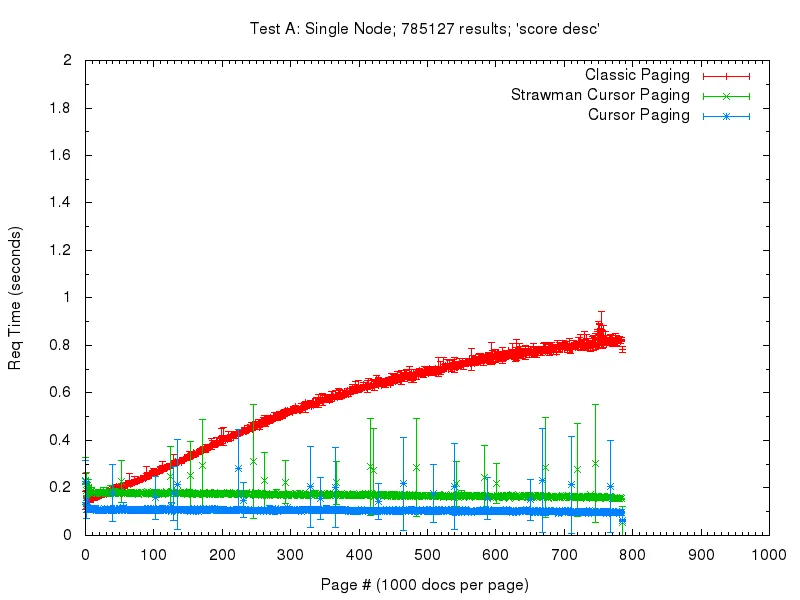
Both single node, and distributed deep paging have been added to Solr! I previously created an example of how to use Solr’s deep paging, and Hoss has a great set of benchmarks showing the performance increases. Here’s one graph from that post showing the most basic case (sorting by score descending) and how performance varies with paging depth. Ignore the green “strawman” line… that was proof-of-concept code that was never committed.
In short, pass cursorMark=* on the first paging request and then you will be given back a nextCursorMark value which you should then pass as cursorMark for your next request.
SimpleQueryParser (registered via the name “simple”) is an alternative to edismax in that they both share the goal of handling user queries without throwing exceptions. Unlike edismax, this parser does not handle full “lucene” query syntax. The q.operator parameter controls what operators are available (by default all are). Example:
&defType=simple # type of the main query is "simple"
&q=solr -search # the user query string
&q.op=AND # all clauses mandatory (the default is OR)
&q.operators=WHITESPACE,NOT # enable the "-" operator (we need whitespace parsing too so the "-" will be seen as an operator)
&qf=title^2 text # query across the title and text field, giving a boost of 2 to the title field
The output of that example query (in lucene sytnax) would be:
Composite ID routing allows one to partition the hash range such that related documents appear on the same part of the hash ring. This allows one to efficiently query over a set of related documents (say a users email messages) without querying the whole collection. The default compositeId router has been extended to accept tri-level routes so partitioning may be done at more than one level. For example, one use case would be to partition first by application id, then by user id, with the final part of the hash being the users document id.
All this simply works out of the box (no configuration needed!). Index documents with ID’s like the following: {"id" : "heliosearch!yonik!mydoc1", ... And then at query time you could specify a route key that restricts queries to nodes containing heliosearch documents: _route_=heliosearch! Or that restricts queries to nodes containing yonik’s heliosearch documents: _route_=heliosearch!yonik!
A new MIGRATE operation has been added to the Solr Collections API that allows one to move part of one collection to another collection based on _route_ (i.e. the ID prefix when using compositeId routing). This is actually a live migration! While the source documents are being copied to the target collection, any updates to those documents will also be forwarded to the target collection. For a short amount of time after the copy is complete, updates to the source documents will continue being forwarded to the target collection. It’s the clients responsibility after that point to send the documents to the correct collection.
Here’s a quick example of migration in action: First start up a single node in ZK mode: